
How to Install the KRWIN App: A Complete Guide for Beginners

The mobile application has revolutionised how people access digital platforms and online entertainment. Users can use various services, manage accounts and search information by connecting to the Internet using a smartphone. If you are interested in the KRWIN App, the first step is to learn how to check if it is available, download it safely and complete the installation process.
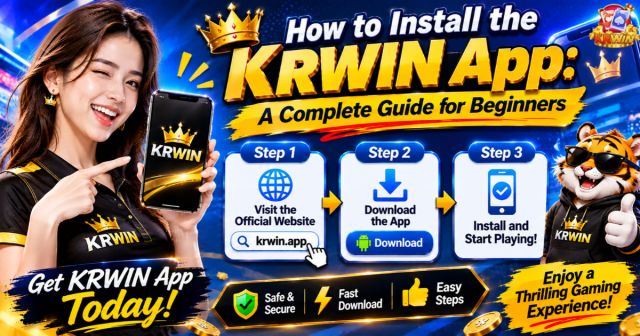
This is a simple guide with all the info you need before installing KRWIN App. Whether it’s about compatibility, download sources, installation steps, or safety measures, this article offers practical insights to aid in making decisions.
Understanding the KRWIN App
It’s possible the KRWIN App is what users might look for when looking for a mobile way to access the KRWIN platform. When downloading an application, it is essential to know if there is an official version and the services this application offers.
Make sure you check out the platform’s information, such as its site, privacy policy, terms of service, and customer support offerings. The availability of Apps and features supported can change, please always verify the latest information through a verified source.
Keep in mind that a recognizable brand name, logo or download button does not guarantee authenticity of an application. Always verify the source before installation!
Prepare Your Smartphone Before Installation
Before starting the KRWIN App installation process, make sure your smartphone is ready. Device compatibility is important as some apps may need certain versions of operating systems or minimal hardware requirements.
Look at the OS version of your phone, and compare this with the stated requirements of the app. One of the most important things to check is the amount of storage space that’s available to you, in case there is room for you to download and install the application.
Maintaining a constant internet connection may help to prevent disconnections during the download. You should also keep your smartphone’s operating system updated on a regular basis since operating system updates may contain critical security enhancements.
Most importantly, make sure that the application is from a verified application or the app store. Do not use less well-known sites that provide installation files that don’t have information on their sources.
How to Download and Install the KRWIN App
Depending on your smartphone’s operating system, and the availability of a verified application, the installation process may vary.
The first step is to make sure that the KRWIN App exists in a trusted app store or is available from a trusted site. Before you do more, check the developer information, application description, update history and device requirements.
If there is a valid app-store listing, go to the listing and install the application according to the instructions on your device. Wait until the download is complete before using the application.
In the event that the supplier provides another installation approach, confirm the website and Follow the instructions published by the supplier carefully. Check for any security alerts on your cell phone. Do not turn off built-in security features to install an unknown file.
Once installed, unfurl the menus of the KRWIN App. Check out the account details, privacy policies, terms of use, and customer service. Follow verification process to set up an account, and use a solid, different password.
Exploring the KRWIN App Features
Once the KRWIN App has been installed and you have successfully installed it, please spend a few minutes learning about the functions in your version. Features may vary based on provider and deployment of the applications.
One thing to look at is the user interface. With clear menus and easy-to-read page sections, mobile navigation can be easier. Account management choices may also enable users to check account details and login information.
Another thing to look into is mobile access. Check if the application looks good on your Smartphone and if the pages resize according to the different screen sizes.
It’s also a great idea to check the security options and customer support available. Knowing how to locate the privacy controls and support can be beneficial when dealing with any questions or technical issues.
Common KRWIN App Installation Problems
Users may have problems downloading or opening mobile applications. In the event of an unstable internet connection, the download could be interrupted and if there isn’t enough storage, the installation may not complete.
An incompatibility of devices can happen, if for instance, a smartphone fails to meet the published requirements of the application. If this is the case, verify that you’re using an operating system that is supported and that you have the correct device information.
Don’t brush off the message if your smartphone shows a security warning; read it carefully. Don’t install files from unverifiable sources. If the app fails to open properly, try restarting the device, updating, and/or seeking verified support.
If the problem persists, don’t get anything else that you need to replace from an unknown source website. If you choose to use an alternative that isn’t verified, you could be putting your device and personal data at unnecessary risk.
Important Security Tips for KRWIN App Users
Security should be a concern at the entire installation and account access stage. Only download apps from trusted sources and ensure that the operating system and installed applications are up-to-date.
Check app permissions prior to granting access to personal information. Use a robust password and don’t use the same one on other sites – never share your password or one time verification code with anyone.
Exercise caution when clicking on links or opening unsolicited emails, and avoid any unrecognized promotions offering special access. Additionally, be sure to read the platform’s privacy policy so you understand how your information could be collected, stored and used.
Responsible Use and Final Thoughts
Getting to know how to install the KRWIN App is not just about locating a download link. You must do a compatibility check, verify the app source, map permissions and secure your smartphone during installation.
Check the requirements, conditions, and any legal limitations that may apply to an online gaming platform before participating in any games. Consider games a leisure activity, set a budget for playing games and never spend money that should be used for necessities.
If you are a novice, it’s always worth taking a careful approach. Check the application, trust a trusted installation guide, and ensure digital security. By taking the necessary precautions, you will be able to make informed decisions while using the KRWIN App and its mobile experience.
Anyone can join.
Anyone can contribute.
Anyone can become informed about their world.
"United We Stand" Click Here To Create Your Personal Citizen Journalist Account Today, Be Sure To Invite Your Friends.
Before It’s News® is a community of individuals who report on what’s going on around them, from all around the world. Anyone can join. Anyone can contribute. Anyone can become informed about their world. "United We Stand" Click Here To Create Your Personal Citizen Journalist Account Today, Be Sure To Invite Your Friends.
LION'S MANE PRODUCT
Try Our Lion’s Mane WHOLE MIND Nootropic Blend 60 Capsules
Mushrooms are having a moment. One fabulous fungus in particular, lion’s mane, may help improve memory, depression and anxiety symptoms. They are also an excellent source of nutrients that show promise as a therapy for dementia, and other neurodegenerative diseases. If you’re living with anxiety or depression, you may be curious about all the therapy options out there — including the natural ones.Our Lion’s Mane WHOLE MIND Nootropic Blend has been formulated to utilize the potency of Lion’s mane but also include the benefits of four other Highly Beneficial Mushrooms. Synergistically, they work together to Build your health through improving cognitive function and immunity regardless of your age. Our Nootropic not only improves your Cognitive Function and Activates your Immune System, but it benefits growth of Essential Gut Flora, further enhancing your Vitality.

Our Formula includes: Lion’s Mane Mushrooms which Increase Brain Power through nerve growth, lessen anxiety, reduce depression, and improve concentration. Its an excellent adaptogen, promotes sleep and improves immunity. Shiitake Mushrooms which Fight cancer cells and infectious disease, boost the immune system, promotes brain function, and serves as a source of B vitamins. Maitake Mushrooms which regulate blood sugar levels of diabetics, reduce hypertension and boosts the immune system. Reishi Mushrooms which Fight inflammation, liver disease, fatigue, tumor growth and cancer. They Improve skin disorders and soothes digestive problems, stomach ulcers and leaky gut syndrome. Chaga Mushrooms which have anti-aging effects, boost immune function, improve stamina and athletic performance, even act as a natural aphrodisiac, fighting diabetes and improving liver function. Try Our Lion’s Mane WHOLE MIND Nootropic Blend 60 Capsules Today. Be 100% Satisfied or Receive a Full Money Back Guarantee. Order Yours Today by Following This Link.


| Visits: | 1,839,666,342 |
| Stories: | 8,743,449 |
Whistler Blowers, Insiders

