

How to Open and Convert CDR, AI, and EPS Files Without CorelDRAW or Illustrator

By Jordan Blake
The short answer
CDR files open reliably only in CorelDRAW, AI files in Illustrator, and EPS files in apps that can interpret PostScript. Without those programs, the practical route is to convert the files into formats everyone can open: PDF for proofs and print, PNG or JPG for previews, SVG for the web. reaConverter, a Windows batch converter from ReaSoft Development that handles 800+ formats, can convert CDR files to PDF, PNG, or SVG, and does the same for AI and EPS, for whole folders at once.
If you need to edit the artwork rather than view or print it, ask the sender for an editable PDF or SVG, or use the original application. Conversion gets you a usable file, not a design file that behaves exactly like the original.
Who ends up with design files they cannot open?
Vector design files travel far beyond design studios. They arrive as “the logo” or “the print file” in places where nobody has the software that made them.
- Print shops and sign makers receive customer artwork in CDR, AI, and EPS every day, often from customers who no longer have the original program either.
- Marketing teams inherit brand folders full of logos and brochures made years ago by agencies that are long gone.
- Web developers are handed an EPS logo and asked to put it on a website.
- Office staff try to drop an EPS into a Word document and find it will not insert.
- Agencies keep archives of client work that span two decades of CorelDRAW and Illustrator versions.
CorelDRAW is especially common in sign making, embroidery, and print in many countries, so CDR files keep landing in mixed teams where most people use other tools.
What is inside CDR, AI, and EPS files?
The three formats look similar in a folder but are built very differently, and that decides how easily they convert.
|
Format |
Made by |
What is inside |
Why it may not open |
|
CDR |
CorelDRAW |
A proprietary format that changed between versions |
Few apps besides CorelDRAW read it, and current CorelDRAW no longer opens files made before version 6 |
|
AI |
Adobe Illustrator |
Modern files usually carry a PDF version of the artwork inside |
Files saved without the PDF-compatible option show only a warning outside Illustrator |
|
EPS |
Many design apps |
PostScript code, often with a small preview image |
Apps without a PostScript interpreter show only the low-resolution preview, or nothing |
This explains a common surprise. An AI file may open fine in a PDF viewer, while the next one from the same client shows a single line of text saying it was saved without PDF content. Both are AI files; only one carries a PDF inside.
EPS has its own twist. Microsoft disabled EPS images in Office in 2017 for security reasons, so an EPS logo will not insert into Word or PowerPoint. Converting it to PNG or SVG solves that in seconds.
Which output should you choose?
Pick the format by what happens to the file next, not by habit.
|
Next step |
Output |
Why |
|
Customer approval or proofing |
|
Opens everywhere and shows the layout as one page |
|
Website, app, or slide deck |
PNG with transparent background, or SVG |
PNG works in every tool; SVG stays sharp at any size |
|
Word or PowerPoint |
PNG or SVG |
Office no longer accepts EPS |
|
Commercial print |
TIFF in CMYK at print resolution, or the printer’s preferred PDF |
Matches what press workflows expect |
|
Archive thumbnails |
JPG |
Small and fast to browse |
Resolution matters whenever you leave vector territory. A logo rendered at 72 dpi looks fine on screen and terrible on a banner. For print, render at 300 dpi at the final size; for screens, render at two times the largest display size so it stays crisp on high-density displays.
Which tools open or convert these files?
|
Tool |
Cost |
CDR |
AI |
EPS |
Batch |
Watch out for |
|
CorelDRAW |
Subscription or license |
Yes, version 6 and later |
Import |
Import |
Limited |
Overkill if you only need previews |
|
Adobe Illustrator |
Subscription |
No |
Yes, all versions |
Yes |
With actions |
No CDR import |
|
Inkscape |
Free, open source |
Import, results vary |
PDF-compatible files |
With Ghostscript installed |
Command line |
Complex CorelDRAW effects often come in incomplete |
|
Ghostscript |
Free, open source |
No |
PDF-compatible files |
Yes |
Command line |
Technical; no CDR |
|
reaConverter |
Paid, free trial |
Yes |
Yes |
Yes |
Folders, Watch Folders, command line |
Produces converted copies, not editable design files |
No single free tool covers all three formats well. Inkscape comes closest, and it is the right choice if you want to keep editing vectors. For turning a mixed folder of CDR, AI, and EPS into PDFs or PNGs in one pass, a batch converter is faster.
How to batch convert design files in reaConverter
reaConverter reads CDR, AI, EPS, and PDF in the same batch, so a brand folder that grew over twenty years can be processed in one run, offline.
- Collect a test set. Include your oldest and newest CDR files, AI files from different Illustrator versions, and EPS files from several sources.
- Load the folder. Drag it in, or right-click files in Windows Explorer and convert from the context menu.
- Pick the output. PDF for proofs, PNG for screens, TIFF for print.
- Set resolution and background. For AI and EPS, set the loading resolution to match your use, and turn on a transparent background for logos that will sit on colored pages.
- Convert and compare. Click Convert, then open each test result next to the original or the sender’s PDF proof.
For a logo library, the command line saves the most time. This turns every EPS logo under a brand folder into a 300 dpi PNG with a transparent background:
cons_rcp.exe -source_folder “M:BrandLogos” -source_ext eps -read_subfolders 1 -dest_path “M:BrandLogos_PNG” -dest_ext png -adobe_res 300 -adobe_alpha 1 -adobe_aa 1
Repeat with -source_ext ai for Illustrator files. The command line requires reaConverter Pro.
Honest limitations
- Converted copies are not design files. Layers, effects, and editable text from CorelDRAW or Illustrator do not survive as editable objects in a PNG or a proof PDF. Keep the originals.
- CDR is a moving target. CorelDRAW changed its format many times. Test your oldest and newest files before trusting any tool, reaConverter included, with an archive.
- Fonts. Text that was not converted to curves needs the original fonts. Missing fonts get substituted and can shift line breaks in a layout.
- AI without PDF content. Files saved without Illustrator’s PDF-compatible option can only be opened in Illustrator itself.
- Color for print. Converting to CMYK TIFF is not color management. For press work, follow the printer’s PDF and profile requirements.
- reaConverter specifics. Windows only. Watch Folders and the command line need the Pro edition.
FAQ
How do I open a CDR file without CorelDRAW? Inkscape can import many CDR files for free, with variable results on complex artwork. To view or print, convert the file to PDF or PNG with a converter that reads CDR, such as reaConverter.
Can Illustrator open CorelDRAW files? Not directly. Ask the sender to export a PDF, EPS, or SVG from CorelDRAW, or convert the CDR to PDF first.
Why does my AI file say it was saved without PDF content? Illustrator’s PDF-compatible option was turned off when the file was saved. Only Illustrator can open that file; ask for a version saved with PDF compatibility.
Why can’t I insert an EPS into Word or PowerPoint? Microsoft turned off EPS images in Office in 2017 because of a security vulnerability. Convert the EPS to PNG or SVG and insert that instead.
What is the best format to send a logo to a web developer? SVG if the logo is vector artwork, plus a PNG with a transparent background as a fallback.
About the author
Jordan Blake writes about vector, print, and image formats for the reaConverter team and maintains the guides at howto.reaconverter.com. Jordan is most interested in the files that arrive labeled “final” and turn out to need three more programs to open.
Anyone can join.
Anyone can contribute.
Anyone can become informed about their world.
"United We Stand" Click Here To Create Your Personal Citizen Journalist Account Today, Be Sure To Invite Your Friends.
Before It’s News® is a community of individuals who report on what’s going on around them, from all around the world. Anyone can join. Anyone can contribute. Anyone can become informed about their world. "United We Stand" Click Here To Create Your Personal Citizen Journalist Account Today, Be Sure To Invite Your Friends.
LION'S MANE PRODUCT
Try Our Lion’s Mane WHOLE MIND Nootropic Blend 60 Capsules
Mushrooms are having a moment. One fabulous fungus in particular, lion’s mane, may help improve memory, depression and anxiety symptoms. They are also an excellent source of nutrients that show promise as a therapy for dementia, and other neurodegenerative diseases. If you’re living with anxiety or depression, you may be curious about all the therapy options out there — including the natural ones.Our Lion’s Mane WHOLE MIND Nootropic Blend has been formulated to utilize the potency of Lion’s mane but also include the benefits of four other Highly Beneficial Mushrooms. Synergistically, they work together to Build your health through improving cognitive function and immunity regardless of your age. Our Nootropic not only improves your Cognitive Function and Activates your Immune System, but it benefits growth of Essential Gut Flora, further enhancing your Vitality.
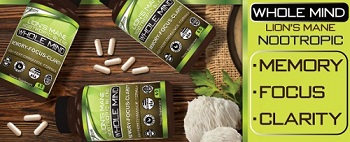
Our Formula includes: Lion’s Mane Mushrooms which Increase Brain Power through nerve growth, lessen anxiety, reduce depression, and improve concentration. Its an excellent adaptogen, promotes sleep and improves immunity. Shiitake Mushrooms which Fight cancer cells and infectious disease, boost the immune system, promotes brain function, and serves as a source of B vitamins. Maitake Mushrooms which regulate blood sugar levels of diabetics, reduce hypertension and boosts the immune system. Reishi Mushrooms which Fight inflammation, liver disease, fatigue, tumor growth and cancer. They Improve skin disorders and soothes digestive problems, stomach ulcers and leaky gut syndrome. Chaga Mushrooms which have anti-aging effects, boost immune function, improve stamina and athletic performance, even act as a natural aphrodisiac, fighting diabetes and improving liver function. Try Our Lion’s Mane WHOLE MIND Nootropic Blend 60 Capsules Today. Be 100% Satisfied or Receive a Full Money Back Guarantee. Order Yours Today by Following This Link.


| Visits: | 1,836,688,009 |
| Stories: | 8,729,822 |
Whistler Blowers, Insiders

